#1
Overleaf
Self-hosted Overleaf Community Edition for collaborative LaTeX editing, real-time PDF preview, version history, and project sharing for teams and classrooms.
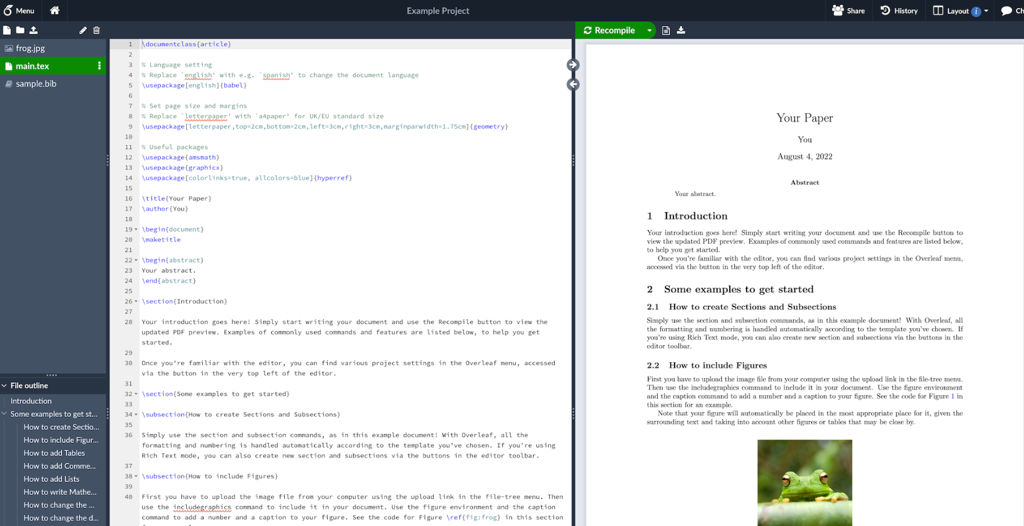
Overleaf is a web-based collaborative LaTeX editor (Community Edition) for writing, compiling, and managing TeX documents in the browser. It provides a shared workspace where multiple authors can edit the same project, track changes, and produce PDFs via an integrated compile pipeline.
Key Features
- Real-time collaborative LaTeX editing with synchronized cursors and change updates
- One-click LaTeX compilation with in-browser PDF preview
- Project-based workspace for files, folders, and assets (figures, bibliographies)
- Version history (project history) and restore points for tracking edits over time
- Git integration support (via Git bridge in Overleaf tooling/ecosystem) for syncing projects with repositories
- User/project sharing and access controls suitable for teams, labs, and classes
- Template-based project creation (common paper formats and journal/conference styles)
Use Cases
- Collaborative academic writing (papers, theses) with co-authors editing concurrently
- Teaching LaTeX in classrooms with shared assignments and templates
- Producing technical documentation with citations, figures, and reproducible builds
Limitations and Considerations
- Full feature parity with Overleaf’s hosted offering depends on edition/configuration; some enterprise/hosted-only capabilities may not be included in Community Edition.
Overleaf Community Edition is well-suited for organizations that want a browser-first LaTeX workflow with collaboration, preview, and history in a single interface. It is commonly used in research groups and education environments to standardize templates and simplify collaboration.
17.1kstars
1.8kforks